Installing PassWall and Xray core on OpenWrt and Xiaomi Mi Router 4A Gigabit Edition router
I have a Xiaomi Mi Router 4A Gigabit Edition router that is configured with OpenWrt. OpenWrt is an open source router firmware that can be installed on a variety of commercial routers, including those from Linksys and Xiaomi. Installing this firmware has the added benefit for Iranians and Chinese of allowing them to install the PasswWall module and route all network traffic through the proxy. We’ll presume you have a Vless configuration or subscription link. Vless-Reality is currently the only reliable way to bypass GFW.
First, reset the router to factory settings so nothing is installed, to move forward safely. Full training is given in this GitHub link, but I will give a quick explanation. BTW, my OpenWRT version is 22.03, and the CPU architecture is mipsel_24k
Connect to OpenWrt through SSH and run the following command:
wget -O passwall.pub https://master.dl.sourceforge.net/project/openwrt-passwall-build/passwall.pub
opkg-key add passwall.pub
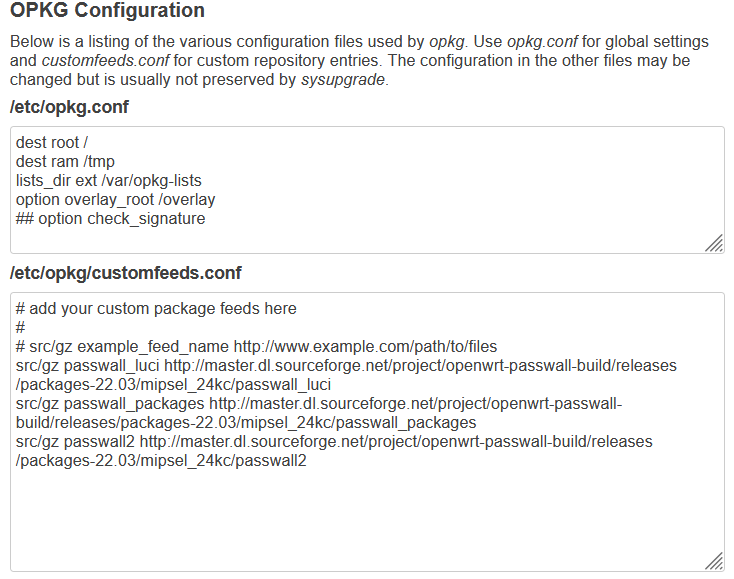
Next, copy this section and place it in the browser in the System section, then Software, then Configure opkg in the CustomFeeds.conf section. Like the picture below:
src/gz passwall_luci http://master.dl.sourceforge.net/project/openwrt-passwall-build/releases/packages-22.03/mipsel_24kc/passwall_luci
src/gz passwall_packages http://master.dl.sourceforge.net/project/openwrt-passwall-build/releases/packages-22.03/mipsel_24kc/passwall_packages
src/gz passwall2 http://master.dl.sourceforge.net/project/openwrt-passwall-build/releases/packages-22.03/mipsel_24kc/passwall2
Also, in opkg.conf, put a # in front of the last line that says Option Check_signature so that it becomes a comment. Save at the end.
Enter the following commands to install PassWall:
opkg update
opkg remove dnsmasq
opkg install  ipset
opkg install ipt2socks
opkg install  iptables
opkg install  iptables-legacy
opkg install  iptables-mod-conntrack-extra
opkg install iptables-mod-iprange
opkg install  iptables-mod-socket
opkg install  iptables-mod-tproxy
opkg install  kmod-ipt-nat
opkg install  dnsmasq-full
opkg install luci-app-passwall
After installation in the Luci web panel, you can see PassWall in the Services section and it is its interface:

TThe path is broken into two sections here. The first section is to install Xray and enter the Vless configurations in Passwall.
If you use the Sing-Box core, or, like me, use the Sing-Box core and notably ShadowTLS, Xray will no longer work, and you should reconsider, as I will explain in the second section.
Section one:
After PassWall is installed, Xray must be installed.
Type the following command to install Xray version 1.8.3 for you. (Given that the internal memory of the Xiaomi Mi Router 4A Gigabit Edition router is not more than 8 megabytes, it is not so easy to install it, but AmirHossein wrote a script that made it easy for us. For more information, see his GitHub.)
wget https://raw.githubusercontent.com/amirhosseinchoghaei/mi4agigabit/main/amirhossein.sh && chmod 777 amirhossein.sh && sh amirhossein.sh
After the complete installation, the Done message will appear, and everything is finished. Add the Node part of your configuration in PassWall. (either manually or with Share URL) Then, on the PassWall main page, select the MainSwitch option and set TCP and UDP to your configuration. Meanwhile, in the Mode section, set the first two to Global Proxy. After saving, the whole network is passed through the proxy.
Section Two:
I have a Raspberry Pi 3 on which I ran Sing-Box and the ShadowTLS client, which created a SOCKS service on the internal network. In this way, for example, I would open a Socks proxy on the computer or phone, or just the Telegram proxy settings, and connect to Raspberry. From there, it was connected to the Internet, and I set all the routes on a single device. For this reason, I made sure that all Iranian sites and IPs do not pass through the Proxy.
Modem <—-> Raspberry (192.168.1.2)
Modem <—–> (192.168.1.3) WAN port of the Xiaomi Mi Router router <—-> Lan port of the router for devices (192.168.2.0/24)
Because the Raspberry Pi is an independent, powerful system, it is easy for me to update it and switch between protocols in the future. That’s why I passed all the traffic through it, so I don’t need Xray anymore.
Add a Socks server in the Node List section, and specify the Raspberry Pi’s local IP address and port. Then, on the PassWall main page, select the MainSwitch option and set TCP and UDP to your configuration. Meanwhile, in the Mode section, set the first two to Global Proxy. After saving, the whole network is passed through the Raspberry Pi. The blocked sites and Iranian IPs are separated on the Raspberry Pi.
Alternative methods:
1- I like the second part very much because it has high flexibility, and I don’t need to wait for the new version of Xray or Sing-Box to be released. As a result, you can use a PC or a zero-client that is always on instead of a Raspberry Pi. You don’t need a powerful computer or even Linux. On Windows, in V2rayN, enable the Allow From Lan setting and enter the system’s internal IP instead of Raspberry.
2- If you have a Raspberry Pi or a PC , but you don’t have access to OpenWrt, you can manually create a SOCKS on your phone, for example, in the V2rayNG program, and give the internal IP of that system. You can even start an HTTP service other than Socks.
3-1- Another option is to install OpenWrt and Xray directly on the Raspberry Pi. Of course, there are no memory issues. As a result, with a Raspberry Pi, for example, the LAN port can be connected to the modem (it becomes a WAN port), and the internet can be delivered to the devices over Wi-Fi. Of course, the Raspberry Pi’s built-in antenna is feeble and lacks support for the 5GHz band, which is one of the method’s drawbacks. (Alternatively, connect to the modem through Wi-Fi and to an Access Point by cable, such as cheap Tenda routers)
3-2- You can do the same for PC, and a wireless network card or an additional network card separates WAN and LAN.
4- You can implement the second part on the Android Box as a server with V2rayNG. Run a Socks service for you through the internal IP.
5- Another option is installing OpenWrt on Mikrotik routers.